
Hey there, friend! Let’s talk about something everyone wonders about at some point how to cancel ChatGPT subscription. Maybe you joined ChatGPT Plus to explore the faster GPT-4 model, but now you hardly use it. Or perhaps you’re budgeting and want to stop OpenAI from charging me every month. Whatever your reason, don’t worry it’s super easy to cancel.
Many users decide to cancel ChatGPT Plus subscription for simple reasons:
- They don’t use it enough to justify the monthly fee.
- They want to try other AI tools like Claude, Gemini, or Perplexity.
- They just need a break or want to switch back to the free version.
You can also browse our Tech Blogs section for easy tutorials, comparisons, and productivity hacks.
You can manage OpenAI subscription anytime. Whether you’re on a laptop or mobile, it takes less than two minutes to cancel your plan and turn off ChatGPT auto-renewal.
And guess what? Canceling doesn’t mean goodbye forever. You can always come back later! If you’re wondering, can I cancel ChatGPT and still use it? the answer is yes! You’ll still have access to the free GPT-3.5 model even after canceling your paid plan.
So, sit back and relax this friendly guide will walk you through how to cancel ChatGPT subscription in detail, show you ChatGPT Plus cancellation steps, and help you if your ChatGPT subscription not showing cancel button.
By the end, you’ll know everything about how to cancel ChatGPT subscription from start to finish easy, fast, and stress-free.
If you ever need a refund, check the ChatGPT subscription refund policy on OpenAI’s website to see whether you qualify. Usually, refunds aren’t automatic but they can help if something went wrong with your payment.
Learning how to cancel ChatGPT subscription is simple once you know where to click so let’s jump in!
Step-by-Step: How to Cancel ChatGPT Subscription (Web Version)
If you’re on a computer, here’s how to cancel ChatGPT Plus subscription safely and smoothly. This is the most common and reliable method of learning how to cancel ChatGPT subscription directly from your desktop or laptop.
🖥️ Step 1: Log in to ChatGPT
Head to chat.openai.com and sign in. Make sure you’re using the same email or login method you used when you upgraded to Plus.
⚙️ Step 2: Open Settings
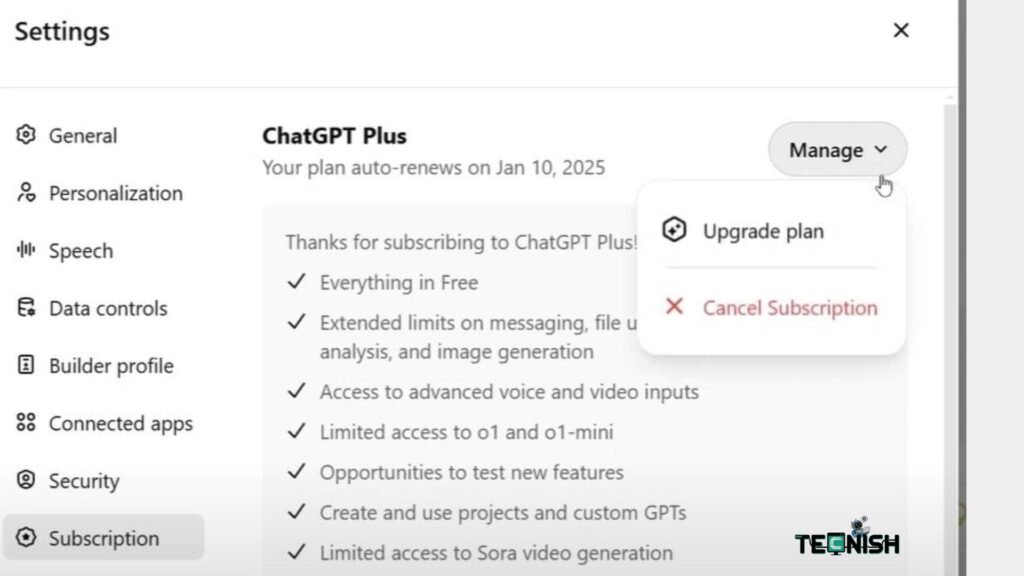
In the bottom-left corner, click your name or the three dots (•••). Choose Settings.
This is where you’ll find options to manage OpenAI subscription, control your data, and view billing info.
💳 Step 3: Go to Subscription Settings
Click My Plan or Manage My Subscription. You’ll see your active plan, renewal date, and payment history.
❌ Step 4: Click ‘Cancel Plan’
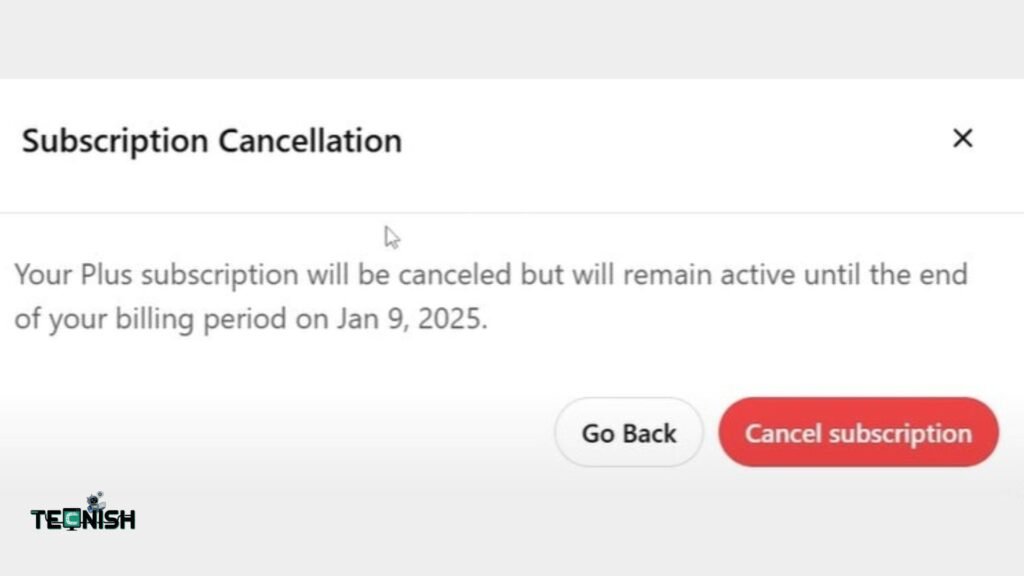
Click the Cancel Plan button and confirm. This is one of the key ChatGPT Plus cancellation steps that officially stops your ChatGPT recurring payment.
📩 Step 5: Check Your Email
You’ll get a confirmation email from OpenAI right away. Keep it for your records, just in case.
💡 Pro Tip: After you cancel OpenAI GPT-4 plan, you’ll still have full access to GPT-4 until your current billing cycle ends. Then, your account will automatically switch back to the free GPT-3.5 version.
If your ChatGPT subscription not showing cancel button, try logging in from another browser, clearing cookies, or visiting help.openai.com. Sometimes, browser extensions can hide the cancel option..
How to Cancel ChatGPT on Mobile (iOS / Android)
Canceling on mobile is just as easy whether you want to unsubscribe from ChatGPT mobile app, learn how to cancel ChatGPT on iPhone, or understand how to cancel ChatGPT on Android, the process takes only a few taps.
📱 Step 1: Open the ChatGPT App
Tap the ChatGPT icon on your device and sign in.
⚙️ Step 2: Open Account Settings
Tap your profile picture (top-right on iPhone, top-left on Android). Then go to Settings → Account → Manage My Subscription.
❌ Step 3: Tap ‘Cancel Plan’
You’ll see a Cancel Plan button. Tap it, confirm, and you’re done.
If your subscription is handled through Apple or Google Play,The app will display a message like “Your subscription is managed by Apple” or “managed by Google Play.” If you see this, follow the steps in the next section to continue how to cancel ChatGPT subscription completely.
Bonus Tip: If you ever want to how to downgrade ChatGPT plan from Plus to Free without canceling completely, this same menu lets you switch easily once your billing period ends.
So yes, you can turn off ChatGPT auto-renewal right from your phone and stop being billed next month.
You’ve now learned how to cancel ChatGPT subscription on both desktop and mobile but let’s not forget the app-store method.
Stay ahead of tech updates by visiting our Tech News section.
How to Cancel ChatGPT Subscription via App Store or Google Play
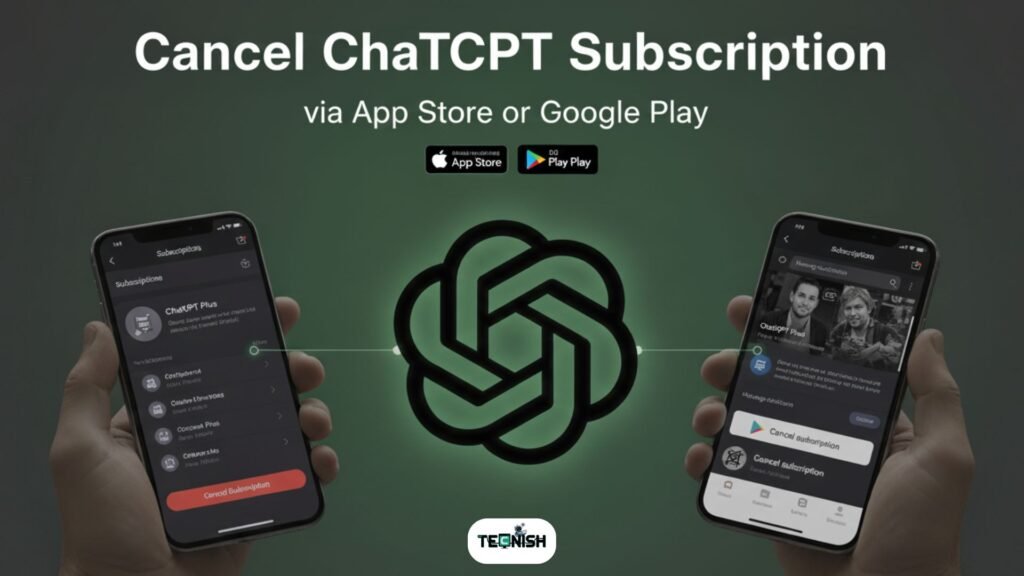
If you used your phone to subscribe, you probably paid through Apple’s App Store or Google Play Store. In that case, OpenAI doesn’t handle your payments the app store does. So you’ll cancel it there.
🍎 For iPhone or iPad Users (Apple App Store)
Here’s how to cancel ChatGPT on iPhone or iPad easily:
- Open your Settings app.
- Tap your name at the top.
- Tap Subscriptions.
- Find ChatGPT in the list.
- Tap Cancel Subscription, then confirm.
That’s it! Apple stops billing you right away and ends the next renewal.
🤖 For Android Users (Google Play Store)
Here’s how to cancel ChatGPT on Android:
- Open the Google Play Store app.
- Tap your profile icon.
- Go to Payments & subscriptions → Subscriptions.
- Select ChatGPT.
- Tap Cancel Subscription and confirm.
This process ensures you stop ChatGPT recurring payment safely and prevent future charges.
💡 If you face issues like “ChatGPT subscription not showing cancel button,” make sure you’re logged into the correct Google or Apple ID that purchased the subscription.
There you’ll find trending AI stories like Microsoft’s Latest AI Push in 2025 and The Rise of AI Assistants in 2025, both packed with insights for AI enthusiasts.
With this, you’ve completed all the main methods of how to cancel ChatGPT subscription web, mobile, and app store.
What Happens After You Cancel?
Now that you know how to cancel ChatGPT subscription, you might be wondering what happens next? Don’t worry, there’s no hidden trap or sudden loss of access. Here’s what really goes down when you decide to cancel ChatGPT Plus subscription or cancel OpenAI GPT-4 plan.
Once you confirm your ChatGPT Plus cancellation steps, you’ll still enjoy all the Plus benefits like faster GPT-4 responses until your current billing cycle ends. That means if you canceled today but your payment renews next week, you’ll still get full access until that date.
After that, your account automatically switches to the free plan. You can still chat, learn, and experiment with GPT-3.5 so if you ever asked, can I cancel ChatGPT and still use it?, the answer is a big yes! 🙌
Here’s a quick breakdown of what happens post-cancellation:
| Action | Result |
| You cancel mid-month | Plus features remain active until billing end |
| Billing date passes | Account switches to free GPT-3.5 |
| Want Plus again later | You can re-upgrade anytime |
| Worried about data loss | Don’t be chats and history stay intact |
It’s a lot like hitting the pause button, not delete. You’re just stopping payments and turning off ChatGPT auto-renewal.
💡 Pro Tip: If you think you might come back soon, it’s better to stop ChatGPT recurring payment rather than deleting your account completely. That way, you won’t lose saved conversations or preferences.
Also, before you finalize, it’s a good idea to review the ChatGPT subscription refund policy. OpenAI generally doesn’t refund mid-cycle cancellations, but exceptions exist for billing errors.
If you’re the curious kind and want to stay updated on AI trends, check out Tecnish Tech News for the latest stories especially articles like The Rise of AI Assistants in 2025 that explore how ChatGPT and similar tools are evolving.
Troubleshooting
Even though learning how to cancel ChatGPT subscription is easy, sometimes little tech hiccups can make it tricky. Let’s walk through the most common problems people face and how to fix them fast.
❓Didn’t see the “Cancel” button?
If your ChatGPT subscription not showing cancel button, don’t panic. This often happens when:
- You’re using a different account than the one you subscribed with.
- You purchased ChatGPT through the App Store or Google Play (those must be canceled separately).
- Your browser has cached data try logging out, clearing cookies, and logging back in.
If it’s still missing, head to OpenAI’s Help Center they’re quick to assist.
💳 Canceled but still charged?
If you’ve already confirmed cancellation but still got billed, that might be because your renewal happened before cancellation went through. Check your ChatGPT subscription refund policy or email OpenAI support for help.
🔐 Can’t log in to your account?
Try resetting your password or logging in with your original sign-up method (Google, Apple, or email).
🗑️ Want to delete your account too?
If you’d rather remove your data completely, OpenAI lets you delete your account via their data deletion form. But remember, if you only want to how to downgrade ChatGPT plan, deletion isn’t necessary just switch back to the free plan instead.
💡 Bonus Tip: Visit Tecnish Software and Apps for more troubleshooting guides and helpful step-by-step tutorials on popular AI tools.
Final Thoughts
Whether you’re cutting costs, trying a new AI, or just taking a digital break, learning how to cancel ChatGPT subscription is part of being a smart user. You’re not quitting technology you’re managing it wisely.
Sometimes, you need to step back, see what else is out there, and return later with a fresh perspective. Maybe you’ll try tools like Perplexity or Gemini, or even read our feature on Perplexity vs ChatGPT – Which AI Tool Is Best in 2025.
Remember, you can always come back and manage OpenAI subscription anytime. The process is smooth, secure, and user-friendly.
Here’s a friendly reminder: canceling doesn’t lock you out forever it just pauses your Plus plan. You’ll still be able to chat, brainstorm, and learn, all with GPT-3.5’s free version.
If you ever need more guides like this one, visit Tecnish and explore our Tech Blogs for tutorials, comparisons, and everyday solutions written in plain, friendly English.
And if you’re curious about where AI is heading, our article Microsoft’s Latest AI Push in 2025 will give you some cool insights into what’s coming next.
Taking a break is perfectly fine technology should work for you, not the other way around. 💪
Common User Questions
Here are some quick questions people often ask when learning how to cancel ChatGPT subscription:
1: Can I cancel ChatGPT and still use it?
Yes! You’ll still have free access to GPT-3.5 only GPT-4 and Plus features will stop after your billing period.
2: Will I get a refund after cancellation?
Usually, no. The ChatGPT subscription refund policy only covers specific billing issues.
3: How do I stop ChatGPT recurring payment?
Just click Cancel Plan in your Manage My Subscription settings this turns off auto-renewal immediately.
4: I can’t find the cancel option what now?
If your ChatGPT subscription not showing cancel button, try another browser or check if you subscribed via the App Store or Google Play.
5: How do I downgrade instead of canceling?
Follow the same path just choose “Switch to Free Plan.” That’s an easy how to downgrade ChatGPT plan option.
Still stuck? Explore the Tecnish Software and Apps category for more easy tutorials like this.
11 Comments
[…] this step feels confusing, check out our beginner’s guide on How to Cancel ChatGPT Subscription Easily (2025) , it uses the same clear step-by-step style we love to share at […]
It was so helpful.
Imagine a world where the sun is blotched out and the only colors are shades of gray. This is the setting of Cormac McCarthy’s The Road, a novel that has captivated millions with its stark realism and emotional weight. It is not just a story about survival; it is a meditation on what it means to be a “good guy” when the rest of the world has turned to savagery. Many literary enthusiasts look for digital copies to keep this masterpiece accessible. If you manage to find the road pdf or an e-book edition, you will hold in your hands a story that challenges your perceptions of hope and despair.
There is nothing quite like the feeling of getting lost in a good book, especially one with such rich character development. The transformation of Mr. Darcy from a haughty aristocrat to a devoted lover is one of the best arcs in fiction. To witness this change, you need access to the full story. Many fans prefer the ease of a Pride and Prejudice PDF, which allows for reading in low light or on the move. Our platform is a celebration of this narrative, ensuring that the legacy of Austen continues. Join millions of others who have found joy in these pages.
For a quick injection of high-quality literature, nothing beats a short classic. The Awakening fits the bill perfectly. To get your fix, find the awakening pdf. It is high art in a small package. The digital format makes it the perfect commuter read.
George Orwell was a prophet of the 20th century. His warnings are still flashing red. Heed the warning. Read the text. Find an Animal Farm PDF. It is the most important thing you can read today.
Mark Twain’s story of boyhood adventure is a timeless gem. The Adventures of Tom Sawyer is a book that resonates with readers of all ages. We provide a digital text that is perfect for modern lifestyles. Our platform ensures that you can access the book quickly and easily. By choosing a Tom Sawyer PDF, you are ensuring that you have a permanent copy of this classic novel, ready to be enjoyed at any time.
Edna’s awakening is a sensory one – she begins to taste, smell, and feel the world more intensely. To experience this sensory overload, download the awakening pdf. The writing is lush and tactile. A digital version allows you to savor the descriptions without distraction. It is a feast for the senses.
The magic is wild and dangerous. It requires a strong will to control. The Onyx Storm epub is the story of that control. The plot is exciting. The ebook version is convenient. It is a fantasy novel that thrills.
As the boundaries between right and wrong blur, the characters are forced to compromise their morals to survive. This moral ambiguity makes the story incredibly engaging. The Onyx Storm epub is a popular choice for book clubs discussing these complex themes. The writing style is immersive, pulling you into the cold, dangerous world of the dragon riders. The digital format allows you to carry the weight of the story without the weight of the paper. It is a masterpiece of modern fantasy.
I enjoy looking through a post that will make people think. Also, thank you for allowing for me to comment!